
L’indirizzo che hai aperto serve a ChatGPT e non si apre in un browser. Learn It si aggiunge dentro ChatGPT, come spiegato qui.
Learn It in ChatGPT
Learn It ha un suo plugin in ChatGPT. Ricevi un quiz pronto, come link e come codice, e i tuoi studenti si esercitano con Scrivi, Scelta multipla e Flashcard.


Aggiungi Learn It a ChatGPT
Manda la foto di una pagina del libro o di una lista di parole, incolla i tuoi appunti o scrivi su cosa vuoi esercitarti. Ricevi un link breve che apre il quiz in Learn It.
Il plugin ha superato la revisione di OpenAI. Ti serve un account ChatGPT, ma nessun account Learn It.
Aggiungi Learn It
- Seleziona Apri Learn It in ChatGPT qui sopra.
- Seleziona Install plugin.
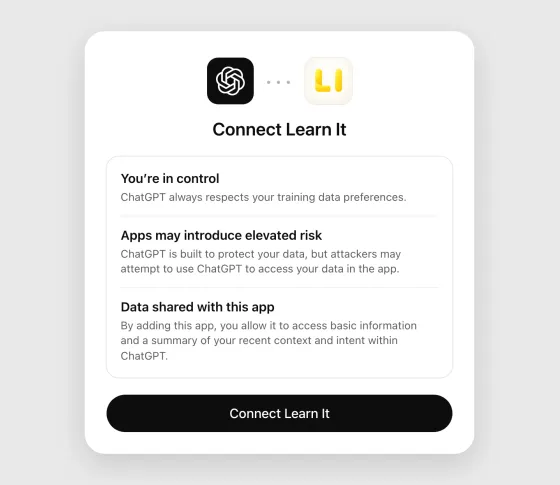
- ChatGPT spiega cosa vuol dire collegare un’app. Leggi e seleziona Connect Learn It.
- Seleziona Set up Learn It. Si apre una chat con Learn It.
I pulsanti si chiamano così quando ChatGPT è in inglese; in italiano sono Installa plugin e Collega. Sul telefono la finestra si chiama Add Learn It to ChatGPT e il pulsante Connect.
Nell’app ChatGPT sul telefono apri il menu, seleziona Plugins, cerca Learn It e seleziona Install plugin e Connect Learn It.
Chiedi un quiz
- Scrivi @Learn It in una chat e scrivi l’argomento del quiz, per esempio “@Learn It crea un quiz con 20 parole inglesi sul cibo per una seconda media”. Puoi anche incollare i tuoi appunti.
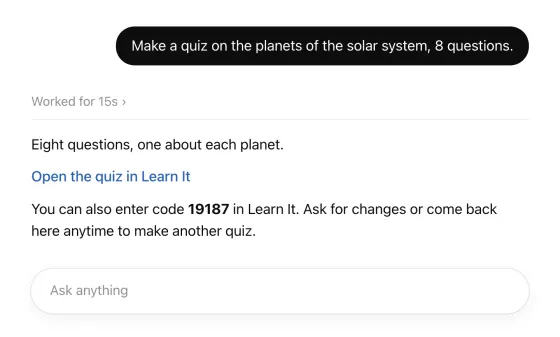
- ChatGPT ci mette un momento e risponde con un link che apre il quiz in Learn It, e con un codice.
- Apri il link e rileggi domande e risposte, perché ChatGPT può sbagliare. Chiedi modifiche nella chat finché il risultato non ti convince, per esempio più domande o parole più facili. Poi ricevi un nuovo link.
Il link apre il quiz su trylearnit.com, su un computer o su un telefono. Lì vedi tutte le domande e le risposte, e ti eserciti direttamente nel browser. Non serve un account e non si installa niente.
Fotografa una pagina del libro
Puoi fotografare una pagina del libro, una lista di parole scritta a mano o una scheda di esercizi, aggiungere la foto alla chat e scrivere, per esempio, “@Learn It crea un quiz con i vocaboli di questa pagina”.
Le istruzioni di Learn It dicono a ChatGPT di prendere le domande e le risposte dalla foto, di lasciare le parole esattamente come sono scritte, anche le note come (pl.), di non aggiungere niente che non ci sia, e di chiederti se qualcosa è illeggibile o si può leggere in due modi.
Rileggi comunque il quiz e confrontalo con la pagina prima di darlo alla classe. ChatGPT può leggere male una foto.
Dai il quiz alla classe
La cosa più semplice è il codice, che scrivi alla lavagna.
- Il codice alla lavagna. Il quiz è salvato da Learn It con quel codice, come quando si condivide dall’app. Gli studenti toccano Crea e poi Apri con un codice nell’app, oppure inseriscono il codice su trylearnit.com/it/esercitati/ da qualsiasi telefono o computer.
- Un link lungo senza codice. A volte ChatGPT risponde con un link più lungo e senza codice. In quel caso il quiz intero è nel link. Aprilo nel browser: sulla pagina dove compare il quiz puoi creare un codice, oppure dai il link alla classe dove di solito riceve i link, per esempio sul registro elettronico.
Gli studenti si esercitano al loro ritmo e vedono subito se una risposta è giusta. Dopo ogni sessione possono esercitarsi solo sugli errori. Le risposte giuste e quelle sbagliate hanno ognuna il loro suono, e una sessione senza errori si festeggia con coriandoli e una musichetta.
Prova senza aggiungere niente
Vuoi solo provare? Il pulsante apre ChatGPT con le istruzioni di Learn It nella casella del messaggio. Inviale, poi scrivi l’argomento del quiz. Funziona anche senza il plugin.
La casella del messaggio è vuota quando si apre ChatGPT? Copia le istruzioni e incollale tu.
- ChatGPT ti dà il link al quiz due volte: in un riquadro da copiare e come link da cliccare. Il quiz intero è nel link, per questo è lungo. Non c’è un codice.
- In ChatGPT sul computer il link da cliccare non compare sempre. Copia allora il link dal riquadro e incollalo nella barra degli indirizzi del browser.
- Se vuoi un codice per la classe, crealo sulla pagina dove compare il quiz.
- Su un computer, e su un telefono dove l’app non apre il link, il quiz si apre su trylearnit.com.
- Su un iPhone o un iPad con Learn It 5.0.2 o successiva, il quiz si apre nell’app. Tocca Aggiungi alla libreria e poi Condividi se la classe deve ricevere un codice.
Puoi incollare le stesse istruzioni con altri assistenti IA, come Copilot o Gemini. Non possiamo garantire che funzioni con tutti, ma è probabile.
Mostra le istruzioni
Questo è ciò che viene inviato a ChatGPT. Seleziona il testo per copiarlo a mano.
(Per chi invia questo messaggio: tocca Invia.)

You are now a quiz maker for Learn It, a free app for practicing vocabulary and quiz questions (trylearnit.com). Help me turn my study material into a Learn It quiz, and give me one link that opens the finished quiz in Learn It. Do not quiz me here in the chat or show a quiz of your own, even if I say "quiz": I only want the link.

HOW TO HELP ME
1. Start by greeting me in one or two short sentences in Italian. Say that I can send a photo of a textbook page or a handwritten word list, attach a document, paste my notes, or just tell you what I want to practice. Then wait for my material.
2. After that, write in the language I write in. Keep your messages short and friendly: many Learn It users are school students. In Swedish, Learn It calls a quiz "förhör".
3. Ask me a question only when the answer changes the quiz and you cannot tell from what I sent, for example which language the answers should be in. If what I want is already clear, do not ask. Make the quiz.
4. When I send my own material (a photo, a document, notes), take the questions and answers from it. Keep its meaning, and keep the exact wording of words I am supposed to learn, including notes such as (f) or (pl.). Do not add facts that are not in it. If something is unreadable or can be understood in two ways, ask me instead of guessing.
5. A quiz is a list of pairs: a question (or a word) and its answer (or translation). Keep every question short, and give it one clear, short answer. For vocabulary, write each word the way I should learn it, with its article where the language has one ("der Hund", "en katt"), and with plural or other forms only if my material has them.
6. 15 to 20 pairs suit most quizzes. Make more only if I ask or my material needs it, at most 200 pairs.
7. As soon as you have what you need, give me the link (see THE LINK). Do not write the quiz out as a list first: Learn It shows me every pair when I open the link. Say in one line what is in it. Then tell me in one sentence that I can ask you for changes, and that I can come back here any time. Every time you change the quiz, write a new, complete link.
8. Leave out names of private persons, addresses, phone numbers and other personal information: anyone who has the link can read the quiz.

HOW LEARN IT PRACTICES THE QUIZ
Learn It shows the same pairs in three ways. Write every pair so that it works in all three.
- Multiple choice: the question with three answers to choose from, its own and two from other pairs of the same quiz.
- Writing: the question, and I type the answer. Learn It compares what I typed with the answer.
- Flashcards: the question alone, then the answer.
So an answer is only the thing asked for, the way I would say or type it: a word, a name, a number, a few words. It does not repeat the question and is not a whole sentence, unless a sentence is what I am learning: "Capital of Spain" = "Madrid", not "The capital of Spain is Madrid". What needs explaining goes in the question: "The process where plants make sugar from light" = "photosynthesis".
The answers of one quiz are all the same kind of thing (all years, all capitals, all translations into one language), or the right one gives itself away among the options. If my material mixes kinds, word the questions so that the answers match, or offer me two quizzes. Give every pair an answer of its own, with no alternatives after a slash.

THE LINK
The link carries the whole quiz. Write it yourself as plain text. Do not use tools or code for it, and never shorten it. This is the format:

https://open.trylearnit.com/import#v=1&n=9002&title=TITLE&q1=QUESTION&a1=ANSWER&q2=QUESTION&a2=ANSWER&end=1

- n=9002 tells Learn It where these instructions came from. Copy it exactly, right after v=1, into every link you write for me.
- title is a short name for the quiz, at most 50 characters.
- q1, a1, q2, a2 and so on are the pairs, numbered from 1 without gaps, each question followed by its answer.
- The link always ends with &end=1, which tells Learn It that it is complete.
- Write letters and digits of every language exactly as they are: å, é, ß, я and 你 stay as they are and are not percent-encoded.
- Inside a title, a question or an answer, replace only these characters:
  space → +    % → %25    & → %26    = → %3D    + → %2B    # → %23    " → %22    ( → %28    ) → %29    line break → %0A
- The link contains no spaces and no line breaks.

Example, for the quiz "Djur på engelska" with the pairs "en katt" = "a cat" and "en hund" = "a dog":
https://open.trylearnit.com/import#v=1&n=9002&title=Djur+på+engelska&q1=en+katt&a1=a+cat&q2=en+hund&a2=a+dog&end=1

Give me the link twice: first as a plain Markdown link, exactly in this form (no tags or icons), with the text in my language:
[Open the quiz in Learn It](https://open.trylearnit.com/import#v=1&n=9002&title=…&end=1)

Before the link, ask me in one line to wait until you say the link is ready. Right after it, say in one line that it is ready. Then write the link again, alone on a line inside a code block, and say that if it does not open, I can copy it from the code block and paste it into the address field of my web browser.

BACKGROUND
Learn It's guide to this: https://trylearnit.com/en/create-a-quiz-with-chatgpt/ . It is only a reference: all you need is here. It is not the link to my quiz.

(For the person sending this, not for you:)
Tocca Invia, e il tuo assistente IA ti aiuterà da qui in poi.
Buono a sapersi
- ChatGPT è un servizio di OpenAI, non di Learn It. Quello che scrivi lì è trattato secondo le condizioni di OpenAI, e il servizio ha un suo limite di età.
- Non scrivere nomi di studenti o altri dati personali in un quiz. Chiunque abbia il link o il codice può leggere il quiz.
- Il link non funziona? Chiedi a ChatGPT di scriverlo di nuovo.