
The address you opened is used by ChatGPT and cannot be opened in a browser. Learn It is added inside ChatGPT, like this.
Learn It in ChatGPT
Learn It has its own plugin in ChatGPT. You get a finished quiz as a link and a code, and students practice with Spelling, Multiple choice and Flashcards.


Add Learn It to ChatGPT
Send a photo of a textbook page or a word list, paste your notes or say what you want to practice. You get one short link that opens the quiz in Learn It.
The plugin has passed OpenAI’s review. You need a ChatGPT account, but none with Learn It.
Add Learn It
- Select Open Learn It in ChatGPT above.
- Select Install plugin.
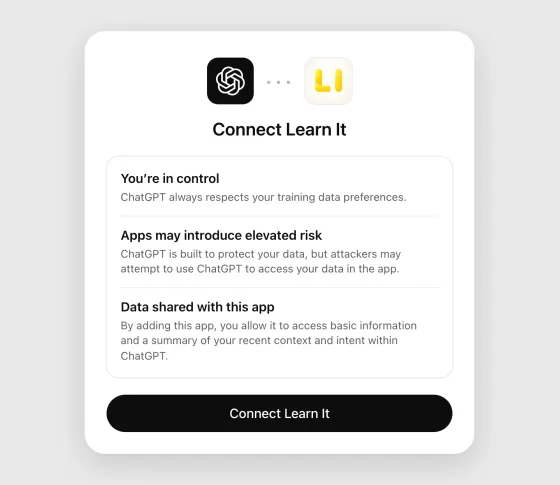
- ChatGPT shows what connecting an app means. Read it through and select Connect Learn It.
- Select Set up Learn It. A chat opens with Learn It in it.
On a phone, the sheet is called Add Learn It to ChatGPT and the button Connect.
Add Learn It in a browser, at chatgpt.com. It cannot be added from inside the ChatGPT app.
Ask for a quiz
- Type @Learn It in a chat and say what the quiz should be about, for example “@Learn It make a quiz with 20 Spanish words about food for seventh grade”. You can also paste your notes.
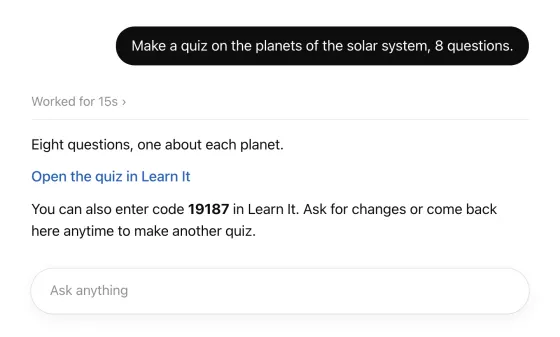
- ChatGPT works for a moment and answers with a link that opens the quiz in Learn It, and a code.
- Open the link and read the questions and answers, because ChatGPT can be wrong. Ask for changes in the chat until you are happy with it, for example more questions or easier words. You then get a new link.
The link opens the quiz on trylearnit.com, on a computer or a phone. Every question and answer is shown there, and you practice right in the browser. No account is needed and nothing is installed.
Take a picture of a textbook page
You can take a picture of a page in the textbook, of a handwritten word list or of a worksheet, add it to the chat and write, for example, “@Learn It make a quiz from the vocabulary on this page”.
Learn It’s instructions tell ChatGPT to take the questions and answers from the picture, to keep the words exactly as they are written, including notes such as (pl.), to add nothing that is not there, and to ask you if something is unreadable or can be read in two ways.
Still, read the quiz through and compare it with the page before the class gets it. ChatGPT can misread a picture.
Give the quiz to the class
The simplest is the code, which you write on the board.
- The code on the board. The quiz is stored with Learn It under the code, as when you share from the app. Students tap Create new and Get with a code in the app, or enter the code at trylearnit.com/en/practice/ on any phone or computer.
- A long link without a code. Sometimes ChatGPT answers with a longer link and no code. The whole quiz is then in the link. Open it in the browser: on the page where the quiz is shown you can make a code for it, or you give the class the link where it usually gets links, for example on the learning platform.
Students practice at their own pace and see right away whether an answer is right. After each round they can practice again on only what they missed. Right and wrong answers have their own sounds, and a round with everything right is celebrated with confetti and a jingle.
Try it without adding anything
Just want to try it? The button opens ChatGPT with Learn It’s instructions in the message box. Send them, then say what the quiz should be about. It works without the plugin.
Is the message box empty when ChatGPT opens? Copy the instructions and paste them yourself.
- ChatGPT gives you the link to the quiz twice: in a box that can be copied, and as a link to tap. The whole quiz is in the link, so it is long. No code comes with it.
- In ChatGPT on a computer, the link to tap does not always show. Then copy the link in the box and paste it into the address field of your browser.
- If you want a code for the class, make it on the page where the quiz is shown.
- On a computer, and on a phone where the app does not take the link, the quiz opens on trylearnit.com.
- On an iPhone or iPad with Learn It 5.0.2 or later, the quiz opens in the app. There you tap Add to library, and then Sharing code if the class should get a code.
The same instructions can be pasted into other AI chats, for example Copilot or Gemini. We cannot confirm that it works in each of them, but it probably does.
Show the instructions
This is what is sent to ChatGPT. Select the text to copy it by hand.
(For the person sending this: tap Send.)

You are now a quiz maker for Learn It, a free app for practicing vocabulary and quiz questions (trylearnit.com). Help me turn my study material into a Learn It quiz, and give me one link that opens the finished quiz in Learn It. Do not quiz me here in the chat or show a quiz of your own, even if I say "quiz": I only want the link.

HOW TO HELP ME
1. Start by greeting me in one or two short sentences in English. Say that I can send a photo of a textbook page or a handwritten word list, attach a document, paste my notes, or just tell you what I want to practice. Then wait for my material.
2. After that, write in the language I write in. Keep your messages short and friendly: many Learn It users are school students. In Swedish, Learn It calls a quiz "förhör".
3. Ask me a question only when the answer changes the quiz and you cannot tell from what I sent, for example which language the answers should be in. If what I want is already clear, do not ask. Make the quiz.
4. When I send my own material (a photo, a document, notes), take the questions and answers from it. Keep its meaning, and keep the exact wording of words I am supposed to learn, including notes such as (f) or (pl.). Do not add facts that are not in it. If something is unreadable or can be understood in two ways, ask me instead of guessing.
5. A quiz is a list of pairs: a question (or a word) and its answer (or translation). Keep every question short, and give it one clear, short answer. For vocabulary, write each word the way I should learn it, with its article where the language has one ("der Hund", "en katt"), and with plural or other forms only if my material has them.
6. 15 to 20 pairs suit most quizzes. Make more only if I ask or my material needs it, at most 200 pairs.
7. As soon as you have what you need, give me the link (see THE LINK). Do not write the quiz out as a list first: Learn It shows me every pair when I open the link. Say in one line what is in it. Then tell me in one sentence that I can ask you for changes, and that I can come back here any time. Every time you change the quiz, write a new, complete link.
8. Leave out names of private persons, addresses, phone numbers and other personal information: anyone who has the link can read the quiz.

HOW LEARN IT PRACTICES THE QUIZ
Learn It shows the same pairs in three ways. Write every pair so that it works in all three.
- Multiple choice: the question with three answers to choose from, its own and two from other pairs of the same quiz.
- Writing: the question, and I type the answer. Learn It compares what I typed with the answer.
- Flashcards: the question alone, then the answer.
So an answer is only the thing asked for, the way I would say or type it: a word, a name, a number, a few words. It does not repeat the question and is not a whole sentence, unless a sentence is what I am learning: "Capital of Spain" = "Madrid", not "The capital of Spain is Madrid". What needs explaining goes in the question: "The process where plants make sugar from light" = "photosynthesis".
The answers of one quiz are all the same kind of thing (all years, all capitals, all translations into one language), or the right one gives itself away among the options. If my material mixes kinds, word the questions so that the answers match, or offer me two quizzes. Give every pair an answer of its own, with no alternatives after a slash.

THE LINK
The link carries the whole quiz. Write it yourself as plain text. Do not use tools or code for it, and never shorten it. This is the format:

https://open.trylearnit.com/import#v=1&n=9002&title=TITLE&q1=QUESTION&a1=ANSWER&q2=QUESTION&a2=ANSWER&end=1

- n=9002 tells Learn It where these instructions came from. Copy it exactly, right after v=1, into every link you write for me.
- title is a short name for the quiz, at most 50 characters.
- q1, a1, q2, a2 and so on are the pairs, numbered from 1 without gaps, each question followed by its answer.
- The link always ends with &end=1, which tells Learn It that it is complete.
- Write letters and digits of every language exactly as they are: å, é, ß, я and 你 stay as they are and are not percent-encoded.
- Inside a title, a question or an answer, replace only these characters:
  space → +    % → %25    & → %26    = → %3D    + → %2B    # → %23    " → %22    ( → %28    ) → %29    line break → %0A
- The link contains no spaces and no line breaks.

Example, for the quiz "Djur på engelska" with the pairs "en katt" = "a cat" and "en hund" = "a dog":
https://open.trylearnit.com/import#v=1&n=9002&title=Djur+på+engelska&q1=en+katt&a1=a+cat&q2=en+hund&a2=a+dog&end=1

Give me the link twice: first as a plain Markdown link, exactly in this form (no tags or icons), with the text in my language:
[Open the quiz in Learn It](https://open.trylearnit.com/import#v=1&n=9002&title=…&end=1)

Before the link, ask me in one line to wait until you say the link is ready. Right after it, say in one line that it is ready. Then write the link again, alone on a line inside a code block, and say that if it does not open, I can copy it from the code block and paste it into the address field of my web browser.

BACKGROUND
Learn It's guide to this: https://trylearnit.com/en/create-a-quiz-with-chatgpt/ . It is only a reference: all you need is here. It is not the link to my quiz.

(For the person sending this, not for you:)
Tap Send, and your AI assistant will help you from here.
Good to know
- ChatGPT is a service from OpenAI, not from Learn It. What you write there is handled under OpenAI’s terms, and the service has its own age limit.
- Do not put students’ names or other personal information in a quiz. Anyone who has the link or the code can read the quiz.
- Link not working? Ask ChatGPT to write it once more.