
La dirección que abriste es para ChatGPT y no se puede abrir en un navegador. Learn It se agrega dentro de ChatGPT, como se explica aquí.
Learn It en ChatGPT
Learn It tiene su propio plugin en ChatGPT. Recibes el quiz terminado en un enlace y un código, y tus estudiantes practican con Escribir, Opción múltiple y Tarjetas.


Agrega Learn It a ChatGPT
Envía una foto de una página del libro o de una lista de palabras, pega tus apuntes o escribe qué quieres practicar. Recibes un enlace corto que abre el quiz en Learn It.
El plugin pasó la revisión de OpenAI. Necesitas una cuenta de ChatGPT, pero no de Learn It.
Agrega Learn It
- Selecciona Abrir Learn It en ChatGPT aquí arriba.
- Selecciona Install plugin.
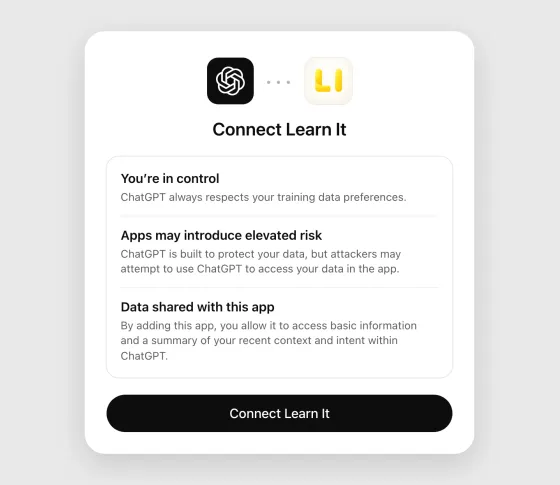
- ChatGPT te explica qué significa conectar una app. Léelo y selecciona Connect Learn It.
- Selecciona Set up Learn It. Se abre un chat con Learn It.
Los botones se llaman así cuando ChatGPT está en inglés. En un teléfono, la ventana se llama Add Learn It to ChatGPT y el botón, Connect.
En la app de ChatGPT en el teléfono, abre el menú, selecciona Plugins, busca Learn It y selecciona Install plugin y Connect Learn It.
Pide un quiz
- Escribe @Learn It en un chat y explica de qué debe tratar el quiz, por ejemplo: “@Learn It haz un quiz con 20 palabras de inglés sobre comida para primero de secundaria”. También puedes pegar tus apuntes.
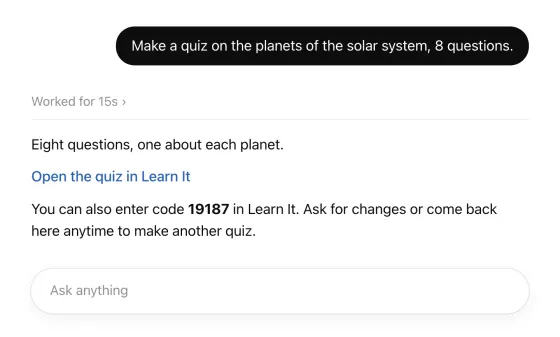
- ChatGPT trabaja un momento y responde con un enlace que abre el quiz en Learn It, y un código.
- Abre el enlace y revisa las preguntas y las respuestas, porque ChatGPT puede equivocarse. Pide cambios en el chat hasta que te guste el resultado, por ejemplo más preguntas o palabras más fáciles. Cada vez recibes un enlace nuevo.
El enlace abre el quiz en trylearnit.com, desde cualquier dispositivo. Ahí se ven todas las preguntas y respuestas, y practicas directamente en el navegador. No necesitas cuenta ni instalar nada.
Toma una foto de una página del libro
Puedes tomar una foto de una página del libro de texto, de una lista de palabras escrita a mano o de una hoja de ejercicios, agregarla al chat y escribir, por ejemplo: “@Learn It haz un quiz con el vocabulario de esta página”.
Las instrucciones de Learn It le piden a ChatGPT que tome las preguntas y las respuestas de la foto, que deje las palabras tal como están escritas, incluidas notas como (pl.), que no agregue nada que no esté ahí y que te pregunte si algo no se lee bien o se puede entender de dos maneras.
Aun así, revisa el quiz y compáralo con la página antes de dárselo a tu grupo. ChatGPT puede leer mal una foto.
Comparte el quiz con tu grupo
Lo más fácil es el código, que escribes en el pizarrón o muestras en la pantalla.
- El código, a la vista de todos. El quiz queda guardado en Learn It con ese código, como cuando compartes desde la app. Los estudiantes tocan Crear nuevo y Abrir con código en la app, o escriben el código en trylearnit.com/es/practicar/ desde cualquier dispositivo.
- Un enlace largo sin código. A veces ChatGPT responde con un enlace más largo y sin código. En ese caso, el quiz completo va dentro del enlace. Ábrelo en el navegador: en la página donde aparece el quiz puedes crearle un código, o compartir el enlace con tu grupo por donde sueles mandarles enlaces, como la plataforma de la escuela.
Los estudiantes practican a su propio ritmo y ven al instante si su respuesta es correcta. Después de cada ronda pueden repasar solo lo que fallaron. Las respuestas correctas y las incorrectas tienen su propio sonido, y una ronda sin errores se celebra con confeti y una melodía.
Pruébalo sin agregar nada
¿Solo quieres probarlo? El botón abre ChatGPT con las instrucciones de Learn It en el cuadro de mensaje. Envíalas y luego di de qué debe tratar el quiz. Funciona sin el plugin.
¿El cuadro de mensaje está vacío cuando se abre ChatGPT? Copia las instrucciones y pégalas tú.
- ChatGPT te da el enlace al quiz dos veces: en un recuadro que puedes copiar y como enlace que se abre directamente. El quiz completo va dentro del enlace, por eso es largo. No trae código.
- Si usas ChatGPT en una computadora, el enlace directo no siempre aparece. En ese caso, copia el enlace del recuadro y pégalo en la barra de direcciones del navegador.
- Si quieres un código para tu grupo, créalo en la página donde aparece el quiz.
- En una computadora, y en un teléfono donde la app no abre el enlace, el quiz se abre en trylearnit.com.
- En un iPhone o iPad con Learn It 5.0.2 o posterior, el quiz se abre en la app. Ahí tocas Agregar a la biblioteca y luego Compartir si quieres darle un código a tu grupo.
Puedes pegar las mismas instrucciones en otros chats de IA, como Copilot o Gemini. No podemos asegurar que funcione en cada uno, pero lo más probable es que sí.
Ver las instrucciones
Esto es lo que se envía a ChatGPT. Selecciona el texto para copiarlo a mano.
(Para quien envía esto: toca Enviar.)

You are now a quiz maker for Learn It, a free app for practicing vocabulary and quiz questions (trylearnit.com). Help me turn my study material into a Learn It quiz, and give me one link that opens the finished quiz in Learn It. Do not quiz me here in the chat or show a quiz of your own, even if I say "quiz": I only want the link.

HOW TO HELP ME
1. Start by greeting me in one or two short sentences in Spanish. Say that I can send a photo of a textbook page or a handwritten word list, attach a document, paste my notes, or just tell you what I want to practice. Then wait for my material.
2. After that, write in the language I write in. Keep your messages short and friendly: many Learn It users are school students. In Swedish, Learn It calls a quiz "förhör".
3. Ask me a question only when the answer changes the quiz and you cannot tell from what I sent, for example which language the answers should be in. If what I want is already clear, do not ask. Make the quiz.
4. When I send my own material (a photo, a document, notes), take the questions and answers from it. Keep its meaning, and keep the exact wording of words I am supposed to learn, including notes such as (f) or (pl.). Do not add facts that are not in it. If something is unreadable or can be understood in two ways, ask me instead of guessing.
5. A quiz is a list of pairs: a question (or a word) and its answer (or translation). Keep every question short, and give it one clear, short answer. For vocabulary, write each word the way I should learn it, with its article where the language has one ("der Hund", "en katt"), and with plural or other forms only if my material has them.
6. 15 to 20 pairs suit most quizzes. Make more only if I ask or my material needs it, at most 200 pairs.
7. As soon as you have what you need, give me the link (see THE LINK). Do not write the quiz out as a list first: Learn It shows me every pair when I open the link. Say in one line what is in it. Then tell me in one sentence that I can ask you for changes, and that I can come back here any time. Every time you change the quiz, write a new, complete link.
8. Leave out names of private persons, addresses, phone numbers and other personal information: anyone who has the link can read the quiz.

HOW LEARN IT PRACTICES THE QUIZ
Learn It shows the same pairs in three ways. Write every pair so that it works in all three.
- Multiple choice: the question with three answers to choose from, its own and two from other pairs of the same quiz.
- Writing: the question, and I type the answer. Learn It compares what I typed with the answer.
- Flashcards: the question alone, then the answer.
So an answer is only the thing asked for, the way I would say or type it: a word, a name, a number, a few words. It does not repeat the question and is not a whole sentence, unless a sentence is what I am learning: "Capital of Spain" = "Madrid", not "The capital of Spain is Madrid". What needs explaining goes in the question: "The process where plants make sugar from light" = "photosynthesis".
The answers of one quiz are all the same kind of thing (all years, all capitals, all translations into one language), or the right one gives itself away among the options. If my material mixes kinds, word the questions so that the answers match, or offer me two quizzes. Give every pair an answer of its own, with no alternatives after a slash.

THE LINK
The link carries the whole quiz. Write it yourself as plain text. Do not use tools or code for it, and never shorten it. This is the format:

https://open.trylearnit.com/import#v=1&n=9002&title=TITLE&q1=QUESTION&a1=ANSWER&q2=QUESTION&a2=ANSWER&end=1

- n=9002 tells Learn It where these instructions came from. Copy it exactly, right after v=1, into every link you write for me.
- title is a short name for the quiz, at most 50 characters.
- q1, a1, q2, a2 and so on are the pairs, numbered from 1 without gaps, each question followed by its answer.
- The link always ends with &end=1, which tells Learn It that it is complete.
- Write letters and digits of every language exactly as they are: å, é, ß, я and 你 stay as they are and are not percent-encoded.
- Inside a title, a question or an answer, replace only these characters:
  space → +    % → %25    & → %26    = → %3D    + → %2B    # → %23    " → %22    ( → %28    ) → %29    line break → %0A
- The link contains no spaces and no line breaks.

Example, for the quiz "Djur på engelska" with the pairs "en katt" = "a cat" and "en hund" = "a dog":
https://open.trylearnit.com/import#v=1&n=9002&title=Djur+på+engelska&q1=en+katt&a1=a+cat&q2=en+hund&a2=a+dog&end=1

Give me the link twice: first as a plain Markdown link, exactly in this form (no tags or icons), with the text in my language:
[Open the quiz in Learn It](https://open.trylearnit.com/import#v=1&n=9002&title=…&end=1)

Before the link, ask me in one line to wait until you say the link is ready. Right after it, say in one line that it is ready. Then write the link again, alone on a line inside a code block, and say that if it does not open, I can copy it from the code block and paste it into the address field of my web browser.

BACKGROUND
Learn It's guide to this: https://trylearnit.com/en/create-a-quiz-with-chatgpt/ . It is only a reference: all you need is here. It is not the link to my quiz.

(For the person sending this, not for you:)
Toca Enviar y tu asistente de IA te ayudará a partir de aquí.
Para tener en cuenta
- ChatGPT es un servicio de OpenAI, no de Learn It. Lo que escribes ahí se maneja según los términos de OpenAI, y el servicio tiene su propia edad mínima.
- No pongas nombres de estudiantes ni otros datos personales en un quiz. Cualquiera que tenga el enlace o el código puede ver el quiz.
- ¿No funciona el enlace? Pídele a ChatGPT que lo escriba otra vez.