
Die Adresse, die du geöffnet hast, wird von ChatGPT verwendet und lässt sich nicht im Browser öffnen. Learn It fügst du direkt in ChatGPT hinzu, so wie hier beschrieben.
Learn It in ChatGPT
Learn It hat ein eigenes Plugin in ChatGPT. Du bekommst ein fertiges Quiz als Link und als Code, und deine Klasse übt mit Schreiben, Multiple Choice und Karteikarten.


Learn It zu ChatGPT hinzufügen
Schick ein Foto einer Schulbuchseite oder einer Vokabelliste, füge deine Notizen ein oder schreib, was du üben willst. Du bekommst einen kurzen Link, der das Quiz in Learn It öffnet.
Das Plugin hat die Prüfung durch OpenAI bestanden. Du brauchst ein Konto bei ChatGPT, aber keins bei Learn It.
Learn It hinzufügen
- Wähl hier oben Learn It in ChatGPT öffnen.
- Wähl Install plugin.
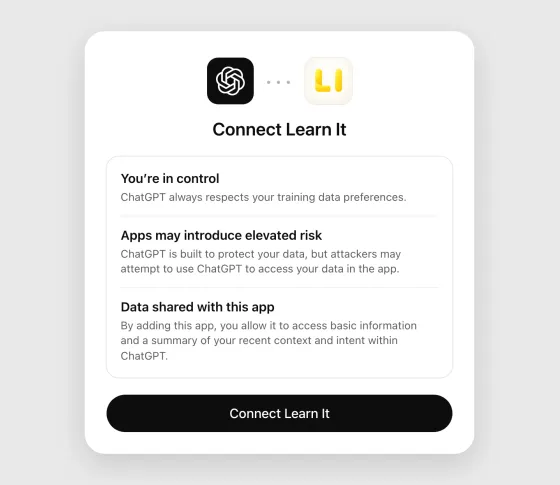
- ChatGPT zeigt, was es bedeutet, eine App zu verbinden. Lies es durch und wähle Connect Learn It.
- Wähl Set up Learn It. Es öffnet sich ein Chat, in dem Learn It mit dabei ist.
So heißen die Buttons, wenn ChatGPT auf Englisch eingestellt ist. Auf dem Handy heißt das Fenster Add Learn It to ChatGPT und der Button Connect.
In der ChatGPT-App auf dem Handy öffnest du das Menü, wählst Plugins, suchst nach Learn It und wählst Install plugin und Connect Learn It.
Ein Quiz anfordern
- Schreib @Learn It in einen Chat und sag, worum es im Quiz gehen soll, zum Beispiel „@Learn It erstelle ein Quiz mit 20 englischen Vokabeln zum Thema Essen für die 7. Klasse“. Du kannst auch deine Notizen einfügen.
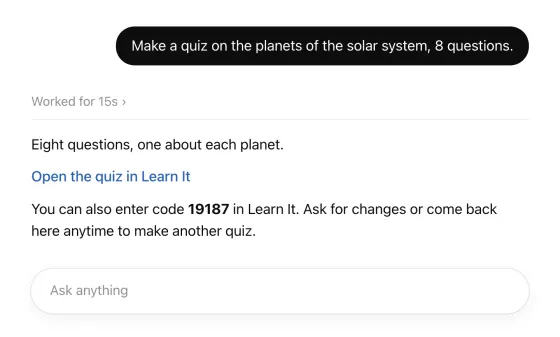
- ChatGPT arbeitet kurz und antwortet mit einem Link, der das Quiz in Learn It öffnet, und einem Code.
- Öffne den Link und lies die Fragen und Antworten durch, denn ChatGPT kann sich irren. Bitte im Chat um Änderungen, bis du zufrieden bist, zum Beispiel um mehr Fragen oder leichtere Wörter. Du bekommst dann einen neuen Link.
Der Link öffnet das Quiz auf trylearnit.com, am Computer oder auf dem Handy. Dort siehst du alle Fragen und Antworten und übst direkt im Browser. Du brauchst kein Konto und musst nichts installieren.
Eine Schulbuchseite fotografieren
Du kannst eine Seite aus dem Schulbuch, eine handgeschriebene Vokabelliste oder ein Arbeitsblatt fotografieren, das Bild in den Chat einfügen und zum Beispiel schreiben: „@Learn It erstelle ein Quiz aus den Vokabeln auf dieser Seite“.
Die Anweisungen von Learn It sagen ChatGPT, die Fragen und Antworten aus dem Bild zu übernehmen, die Wörter genau so zu lassen, wie sie dastehen, auch Zusätze wie (pl.), nichts hinzuzufügen, was nicht dasteht, und dich zu fragen, wenn etwas unleserlich ist oder sich auf zwei Arten verstehen lässt.
Lies das Quiz trotzdem durch und vergleiche es mit der Seite, bevor die Klasse es bekommt. ChatGPT kann ein Bild falsch lesen.
Das Quiz mit der Klasse teilen
Am einfachsten ist der Code, den du an die Tafel schreibst.
- Der Code an der Tafel. Das Quiz ist bei Learn It unter dem Code gespeichert, genau wie beim Teilen aus der App. Die Schülerinnen und Schüler tippen in der App auf Neu und dann auf Mit Code öffnen, oder sie geben den Code auf trylearnit.com/de/ueben/ ein, auf jedem Handy und jedem Computer.
- Ein langer Link ohne Code. Manchmal antwortet ChatGPT mit einem längeren Link und ohne Code. Dann steckt das ganze Quiz im Link. Öffne ihn im Browser: Auf der Seite, auf der das Quiz angezeigt wird, kannst du einen Code dafür erstellen, oder du gibst der Klasse den Link dort, wo sie sonst auch Links bekommt, zum Beispiel auf der Lernplattform.
Alle üben in ihrem eigenen Tempo und sehen sofort, ob eine Antwort richtig ist. Nach jeder Runde können sie nur das wiederholen, was sie nicht wussten. Richtige und falsche Antworten haben eigene Töne, und eine Runde ohne Fehler wird mit Konfetti und einer kleinen Melodie gefeiert.
Ausprobieren, ohne etwas hinzuzufügen
Du willst es nur ausprobieren? Der Button öffnet ChatGPT mit den Anweisungen von Learn It im Eingabefeld. Schick sie ab und sag dann, worum es im Quiz gehen soll. Das funktioniert auch ohne das Plugin.
Ist das Eingabefeld leer, wenn ChatGPT sich öffnet? Kopiere die Anweisungen und füge sie selbst ein.
- ChatGPT gibt dir den Link zum Quiz zweimal: in einem Feld zum Kopieren und als Link zum Anklicken. Das ganze Quiz steckt im Link, deshalb ist er lang. Einen Code gibt es dazu nicht.
- In ChatGPT am Computer wird der Link zum Anklicken nicht immer angezeigt. Kopiere dann den Link aus dem Feld und füge ihn in die Adresszeile deines Browsers ein.
- Wenn du einen Code für die Klasse möchtest, erstellst du ihn auf der Seite, auf der das Quiz angezeigt wird.
- Am Computer und auf Handys, auf denen die App den Link nicht annimmt, öffnet sich das Quiz auf trylearnit.com.
- Auf einem iPhone oder iPad mit Learn It 5.0.2 oder neuer öffnet sich das Quiz in der App. Dort tippst du auf Zur Bibliothek hinzufügen und dann auf Teilen, wenn die Klasse einen Code bekommen soll.
Dieselben Anweisungen kannst du auch in andere KI-Chats einfügen, zum Beispiel in Copilot oder Gemini. Wir können nicht versprechen, dass es in jedem davon funktioniert, aber wahrscheinlich klappt es.
Anweisungen anzeigen
Das wird an ChatGPT gesendet. Markiere den Text, um ihn von Hand zu kopieren.
(Für die Person, die das hier sendet: tippe auf Senden.)

You are now a quiz maker for Learn It, a free app for practicing vocabulary and quiz questions (trylearnit.com). Help me turn my study material into a Learn It quiz, and give me one link that opens the finished quiz in Learn It. Do not quiz me here in the chat or show a quiz of your own, even if I say "quiz": I only want the link.

HOW TO HELP ME
1. Start by greeting me in one or two short sentences in German. Say that I can send a photo of a textbook page or a handwritten word list, attach a document, paste my notes, or just tell you what I want to practice. Then wait for my material.
2. After that, write in the language I write in. Keep your messages short and friendly: many Learn It users are school students. In Swedish, Learn It calls a quiz "förhör".
3. Ask me a question only when the answer changes the quiz and you cannot tell from what I sent, for example which language the answers should be in. If what I want is already clear, do not ask. Make the quiz.
4. When I send my own material (a photo, a document, notes), take the questions and answers from it. Keep its meaning, and keep the exact wording of words I am supposed to learn, including notes such as (f) or (pl.). Do not add facts that are not in it. If something is unreadable or can be understood in two ways, ask me instead of guessing.
5. A quiz is a list of pairs: a question (or a word) and its answer (or translation). Keep every question short, and give it one clear, short answer. For vocabulary, write each word the way I should learn it, with its article where the language has one ("der Hund", "en katt"), and with plural or other forms only if my material has them.
6. 15 to 20 pairs suit most quizzes. Make more only if I ask or my material needs it, at most 200 pairs.
7. As soon as you have what you need, give me the link (see THE LINK). Do not write the quiz out as a list first: Learn It shows me every pair when I open the link. Say in one line what is in it. Then tell me in one sentence that I can ask you for changes, and that I can come back here any time. Every time you change the quiz, write a new, complete link.
8. Leave out names of private persons, addresses, phone numbers and other personal information: anyone who has the link can read the quiz.

HOW LEARN IT PRACTICES THE QUIZ
Learn It shows the same pairs in three ways. Write every pair so that it works in all three.
- Multiple choice: the question with three answers to choose from, its own and two from other pairs of the same quiz.
- Writing: the question, and I type the answer. Learn It compares what I typed with the answer.
- Flashcards: the question alone, then the answer.
So an answer is only the thing asked for, the way I would say or type it: a word, a name, a number, a few words. It does not repeat the question and is not a whole sentence, unless a sentence is what I am learning: "Capital of Spain" = "Madrid", not "The capital of Spain is Madrid". What needs explaining goes in the question: "The process where plants make sugar from light" = "photosynthesis".
The answers of one quiz are all the same kind of thing (all years, all capitals, all translations into one language), or the right one gives itself away among the options. If my material mixes kinds, word the questions so that the answers match, or offer me two quizzes. Give every pair an answer of its own, with no alternatives after a slash.

THE LINK
The link carries the whole quiz. Write it yourself as plain text. Do not use tools or code for it, and never shorten it. This is the format:

https://open.trylearnit.com/import#v=1&n=9002&title=TITLE&q1=QUESTION&a1=ANSWER&q2=QUESTION&a2=ANSWER&end=1

- n=9002 tells Learn It where these instructions came from. Copy it exactly, right after v=1, into every link you write for me.
- title is a short name for the quiz, at most 50 characters.
- q1, a1, q2, a2 and so on are the pairs, numbered from 1 without gaps, each question followed by its answer.
- The link always ends with &end=1, which tells Learn It that it is complete.
- Write letters and digits of every language exactly as they are: å, é, ß, я and 你 stay as they are and are not percent-encoded.
- Inside a title, a question or an answer, replace only these characters:
  space → +    % → %25    & → %26    = → %3D    + → %2B    # → %23    " → %22    ( → %28    ) → %29    line break → %0A
- The link contains no spaces and no line breaks.

Example, for the quiz "Djur på engelska" with the pairs "en katt" = "a cat" and "en hund" = "a dog":
https://open.trylearnit.com/import#v=1&n=9002&title=Djur+på+engelska&q1=en+katt&a1=a+cat&q2=en+hund&a2=a+dog&end=1

Give me the link twice: first as a plain Markdown link, exactly in this form (no tags or icons), with the text in my language:
[Open the quiz in Learn It](https://open.trylearnit.com/import#v=1&n=9002&title=…&end=1)

Before the link, ask me in one line to wait until you say the link is ready. Right after it, say in one line that it is ready. Then write the link again, alone on a line inside a code block, and say that if it does not open, I can copy it from the code block and paste it into the address field of my web browser.

BACKGROUND
Learn It's guide to this: https://trylearnit.com/en/create-a-quiz-with-chatgpt/ . It is only a reference: all you need is here. It is not the link to my quiz.

(For the person sending this, not for you:)
Tippe auf Senden, dann hilft dir dein KI-Assistent weiter.
Gut zu wissen
- ChatGPT ist ein Dienst von OpenAI, nicht von Learn It. Was du dort schreibst, unterliegt den Nutzungsbedingungen von OpenAI, und für den Dienst gilt ein eigenes Mindestalter.
- Schreib keine Namen von Schülern oder andere personenbezogene Daten in ein Quiz. Alle, die den Link oder den Code haben, können das Quiz lesen.
- Der Link funktioniert nicht? Bitte ChatGPT, ihn noch einmal zu schreiben.